
Turn an image into an Excel table
Upload a photo, screenshot or scan of a table or document, in any language or several at once. Every row becomes a record with named columns, ready to query, chart and export to Excel or CSV.
From a picture to rows and columns
- Photos, screenshots and scans
- Any language, or several on one page
- Every row a record with named columns
- Export to Excel or CSV
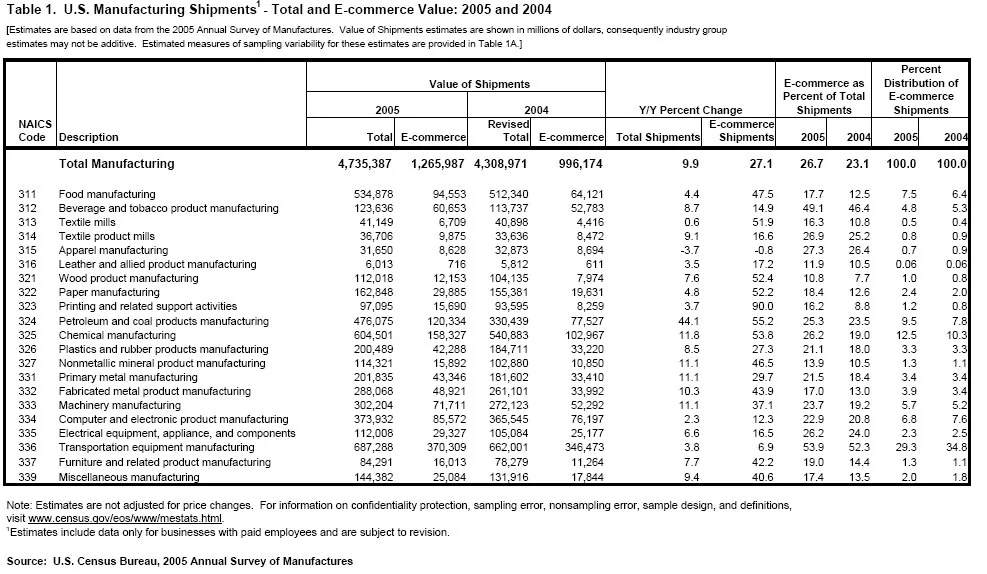 Original document
| Industry Description | Value of Shipments 2005 Total | Y/Y Percent Change Total Shipments |
|---|---|---|
| Total Manufacturing | 4,735,387 | 9.9 |
| Food manufacturing | 534,878 | 4.4 |
| Beverage and tobacco product manufacturing | 123,636 | 8.7 |
Bring a real document.
Working with more than about 100 images a day? Request a pilot and tell us which ones.